Game Knowledge Base
Market
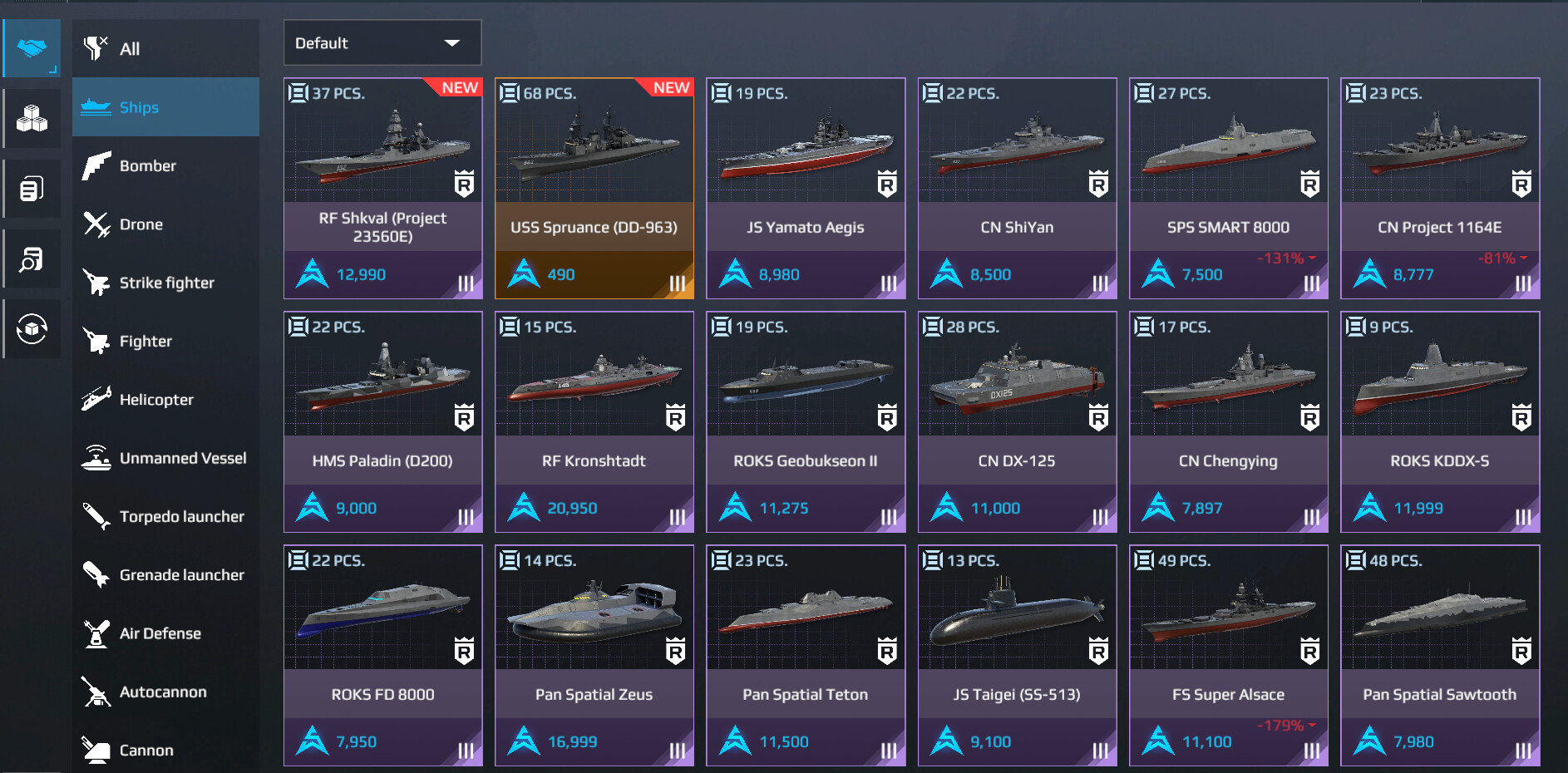
The Market is Modern Warships’ in-game trading platform where players can buy and sell tradable ships, aircraft, and equipment using a special currency — Artcoins (AC).
Each item is assigned an initial price when it enters the Market. After that, its value changes based on player offers within the available price range: buy and sell orders form an order book, while the actual market price gradually changes according to supply and demand.
The Market allows players to obtain content from previous Battle Pass seasons and exclusive items from Big Events. In the latter case, this is usually an item from the event’s paid offer that becomes available for trading after 2 months.
The Market also gives opportunity to sell unwanted items in exchange for Artcoins.
Access to the Market
To use the Market, you need to:
- reach account level 20;
- authorize your account — guest accounts are not eligible;
- have a positive Artcoin balance;
- have no active restrictions or penalties on your account.
Once the Market is unlocked, an in-game tutorial becomes available and can be replayed later if necessary.
Artcoins
Artcoins (AC) are the main currency used on the Market.
They can be obtained by:
- selling tradable ships and equipment;
- watching ads in the mobile version of the game;
- earning them from certain in-game activities, containers, and gachas;
- purchasing them with real money.
Market orders are made exclusively with Artcoins — Dollars and Gold cannot be used.
Which items are available on the Market?
Most Market items fall into two main categories:
- Battle Pass items, including content from previous seasons;
- exclusive Big Event items — usually items from an event’s paid offer;
Some items were originally made available to players directly through the Market (USS Arsenal Ship, RF Moscow, JS Yamato Aegis, Pan Spatial Killswitch, FS Blue Shark, Mi-30D Mantis, USS New Hampshire (BB-1011), CH-1, A-14).
New items cannot always be sold immediately after being obtained:
- Battle Pass items become available for sale after 1 month;
- items from Big Event bundles become available after 2 months.
However, not all in-game content can be traded on the Market. For example, ships purchased for Dollars, Gold, or Ranked Coins usually cannot be sold, nor can other items unless Market trading is specifically enabled for them.
Purchasing Items on the Market
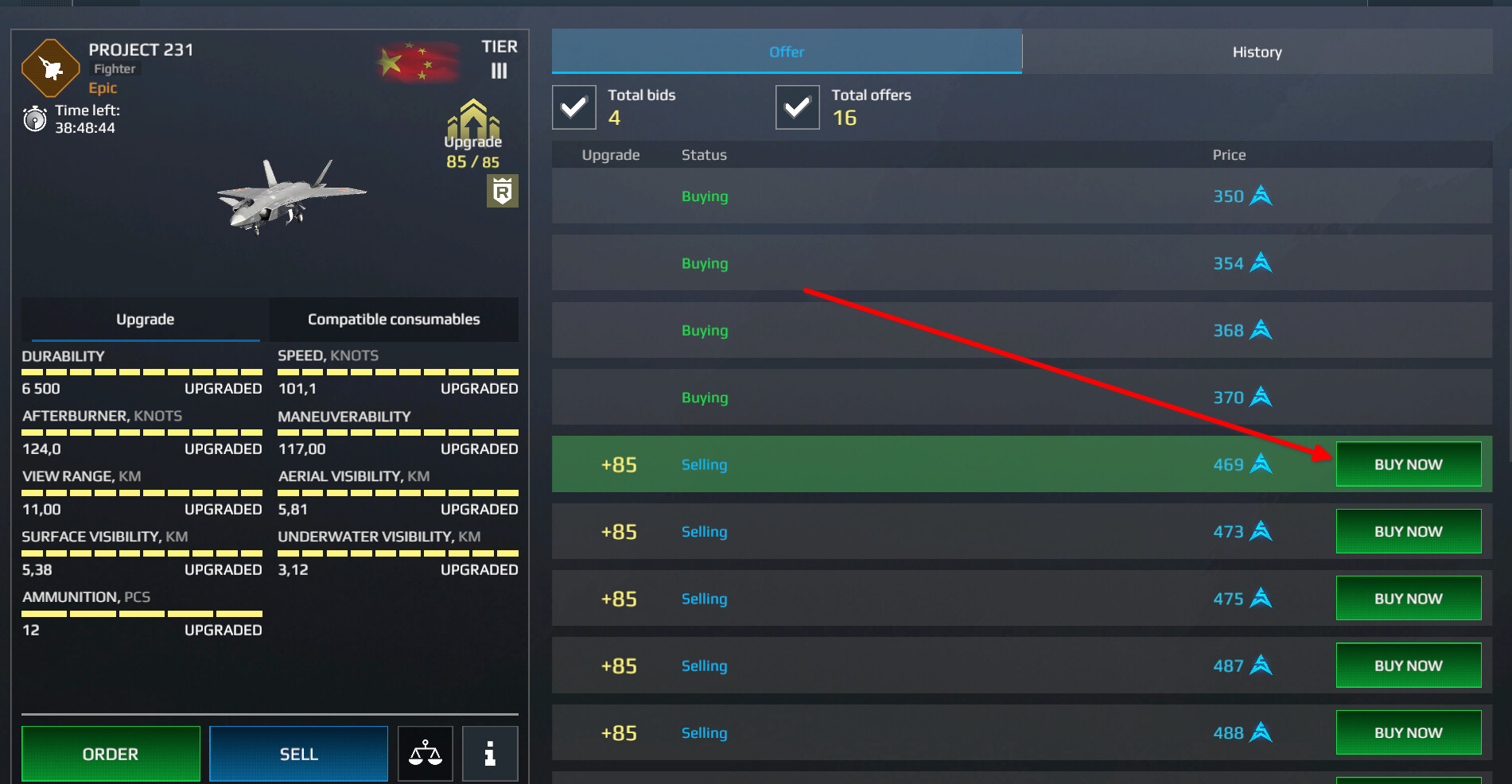
1. Instant Purchase
Open the desired item on the Market and select one of the existing seller offers. The transaction will be completed immediately at the listed price.
When purchasing a ship, pay attention to its loadout: equipment installed on the ship is sold together with it.
2. Buy Order
If you are not satisfied with the current price, you can place a buy order:
Market → Item → Buy → enter a price → confirm
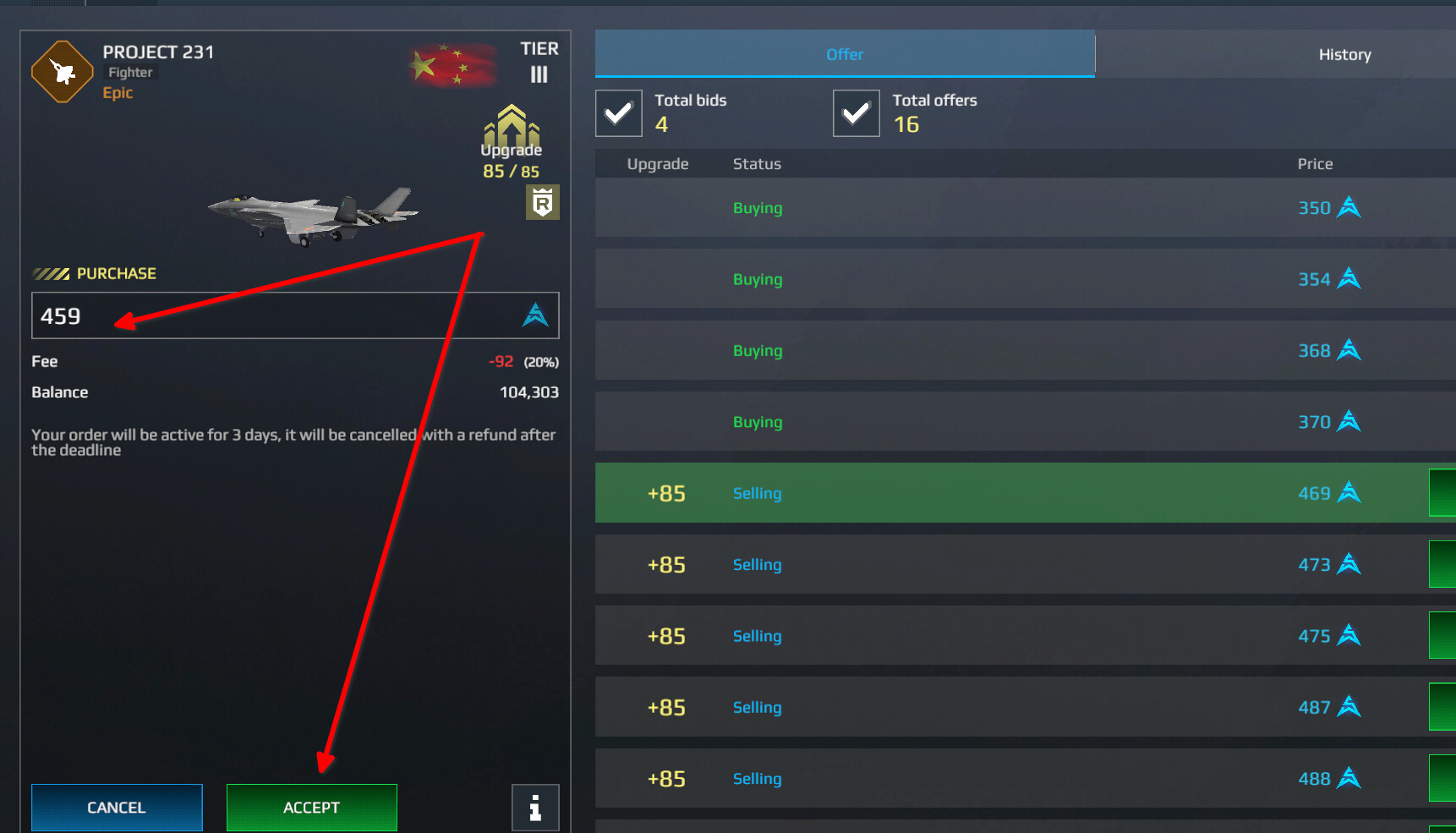
The required amount of AC will be reserved. If a suitable offer appears at your specified price or lower, the purchase will be completed automatically. The system will select the cheapest suitable offer.
A buy order remains active for 72 hours. If the transaction is not completed, or if you cancel the order yourself, the reserved Artcoins will be returned.
You can view your active orders under:
Market → My Orders → Buy
Selling Items on the Market
Open: Market → Inventory → select the desired item
From there, you can:
- create your own sell offer at an available price, similar to placing a buy order;
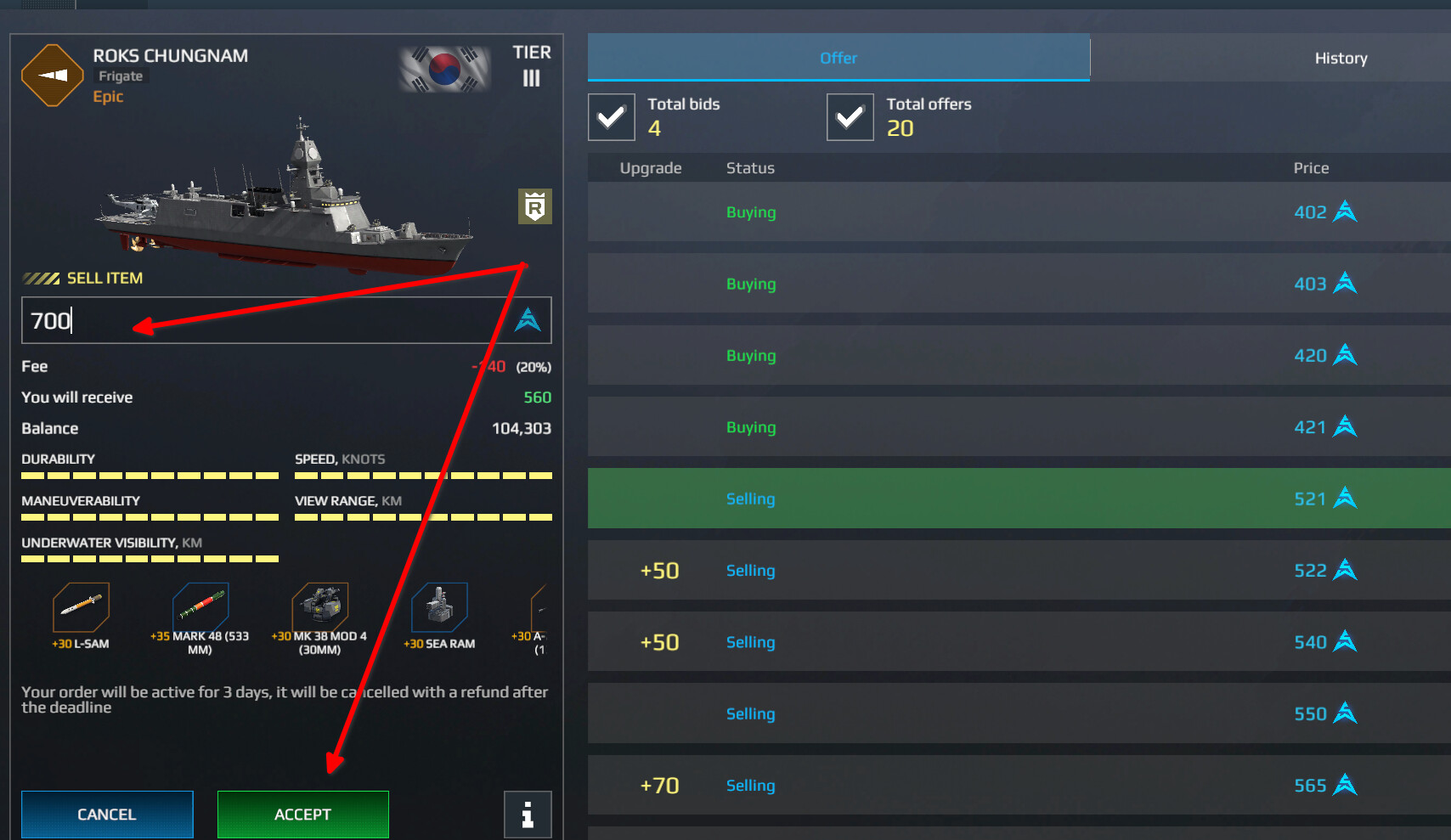
- or sell the item to an existing buyer order.
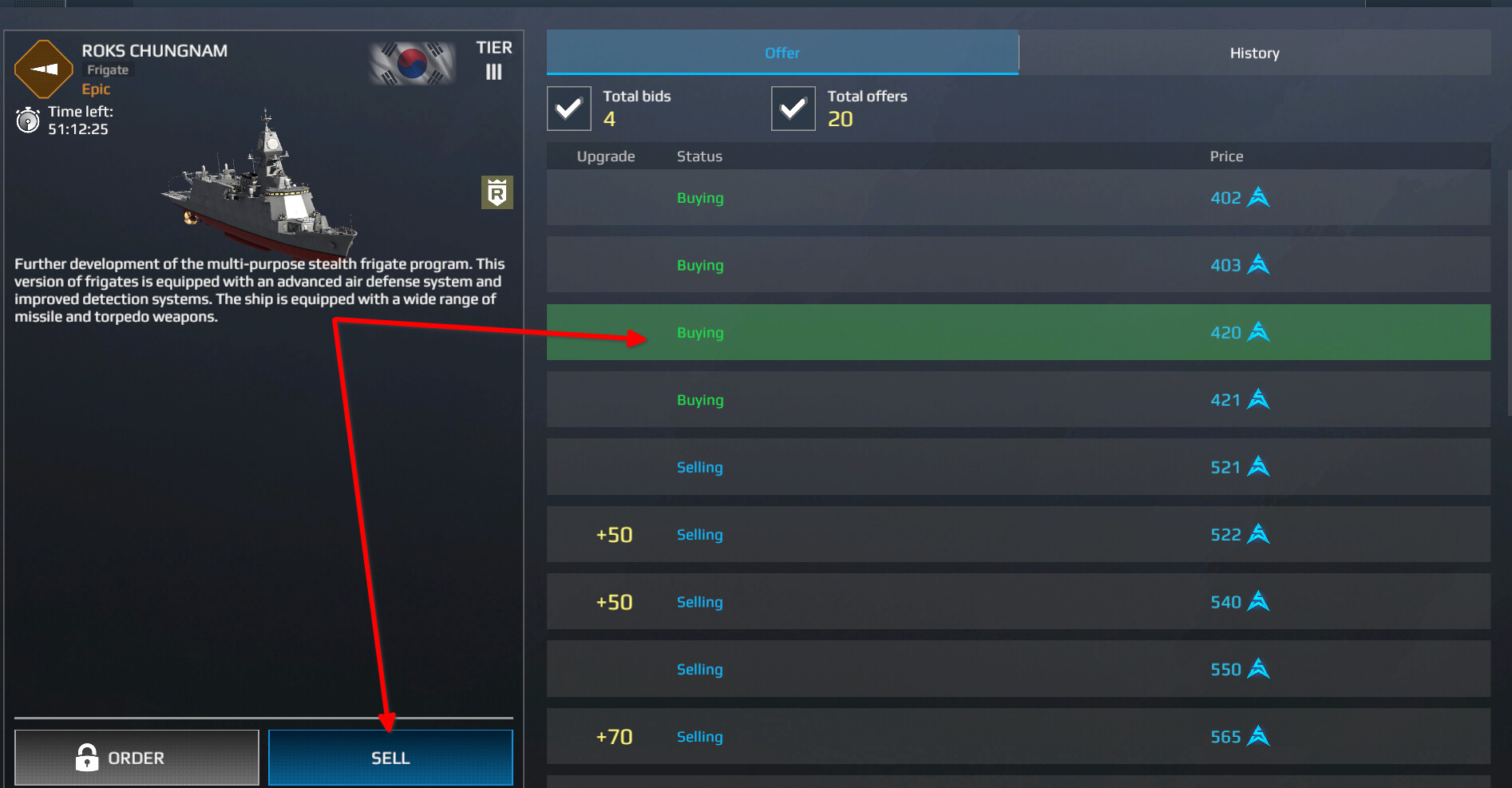
A 20% commission is deducted from standard sales.
For example:
Sale price: 1,000 AC Commission: 200 AC You receive: 800 AC
This is important to keep in mind when reselling items. To recover 1,000 AC spent on a purchase after the commission is deducted, the item must be sold for at least 1,250 AC.
Buyout
Buyout allows you to instantly sell an eligible item and receive Artcoins without waiting for another player.
The Buyout price is determined by the system and is usually lower than the current market value. This difference is the trade-off for a guaranteed instant sale.
Buyout can therefore be useful if you need AC immediately. If there is no rush, it is usually worth checking regular Market offers first.
Selling Ships
All equipment installed on a ship is sold together with it.
Before selling a ship, it is recommended to remove any valuable equipment you want to keep and check its installed customization items.
If a ship has an item installed that cannot be traded on the Market, the system will ask you to replace it.
The following cannot be sold as part of a ship:
- equipment tied to titles — primarily items available through Hero / Legend status;
- unique rewards from gacha events, unless the specific item is eligible for Market trading;
- all Market items.
If your sell offer has not yet been accepted by another player, you can remove it:
Market → My Orders → Sell → Remove
Once a transaction has been completed, the ship cannot be returned and the sale cannot be canceled.
How Do Prices Change?
Each item enters the Market with a specific initial price. After that, its price changes within the available range based on player demand and offers.
The Market also includes a trade history, which allows you to track price changes and see how the current price compares with previous transactions.
Comparing Equipment
Ships, aircraft, and equipment can be compared directly from the Market interface.
You can compare up to three items at a time. Equipment can be compared with items of the same type and tier, while ships can be compared across different classes.
This is especially useful before making an expensive purchase.
Important Restrictions
You Cannot Own Two Identical Ships
If a ship is already in your fleet, you cannot purchase another copy of the same ship on the Market.
No Direct Trading Between Players
Ships, equipment, and Artcoins cannot be transferred directly to a specific player.
Using the Market to intentionally transfer AC between your own accounts or other players’ accounts is also prohibited and may result in account restrictions.
Completed Transactions Cannot Be Canceled
Once a purchase or sale has been completed, the transaction is final. Always check the item, price, and ship loadout before confirming.
Market Security
A Market security code is available if you want additional protection for your account when making Market transactions.
It can be managed under:
Settings → Account
To recover a forgotten code, you will need a linked and verified email address.
What to Remember
- The Market unlocks at level 20.
- All transactions are made using Artcoins.
- Item prices change within the Market order book based on player offers.
- Buy orders remain active for 72 hours.
- A 20% commission is deducted from sales.
- Equipment installed on a ship is sold together with the ship.
- Battle Pass items usually become tradable after 30 days, while items from Big Event offers become tradable after 60 days.
- Buyout allows you to receive AC instantly, but at a reduced price.
- Completed transactions cannot be canceled.
- Direct transfers of items or AC between players may result in account restrictions.