Game Knowledge Base
Frequently Asked Questions (FAQ)
Here you can find answers to frequently asked questions about Modern Warships: accounts, in-game resources, ships and equipment, game modes, the Market, Battle Pass, and other game features.
⠀
Account
1. What should I do if my game progress is lost?
Make sure you are signing in using the same authorization method you used previously.
If a new account opens instead of your existing one, complete the introductory tutorial, go to the account settings, log out, and try signing in again.
If you are unable to restore access on your own, contact Support and provide your account ID and any other information you know about the account.
2. Are some features unavailable on a guest account?
Some online features may be unavailable to guest accounts.
For full access to the game and to protect your progress, we recommend linking your account using one of the available authorization methods.
3. How do I report a player using cheats?
Use the built-in report system in the match statistics screen.
If you need to provide additional evidence of a violation, contact Support.
4. Can I sell or transfer my account to another player?
No. Buying, selling, or transferring game accounts is prohibited by the game rules.
5. Where can I find my game account ID?
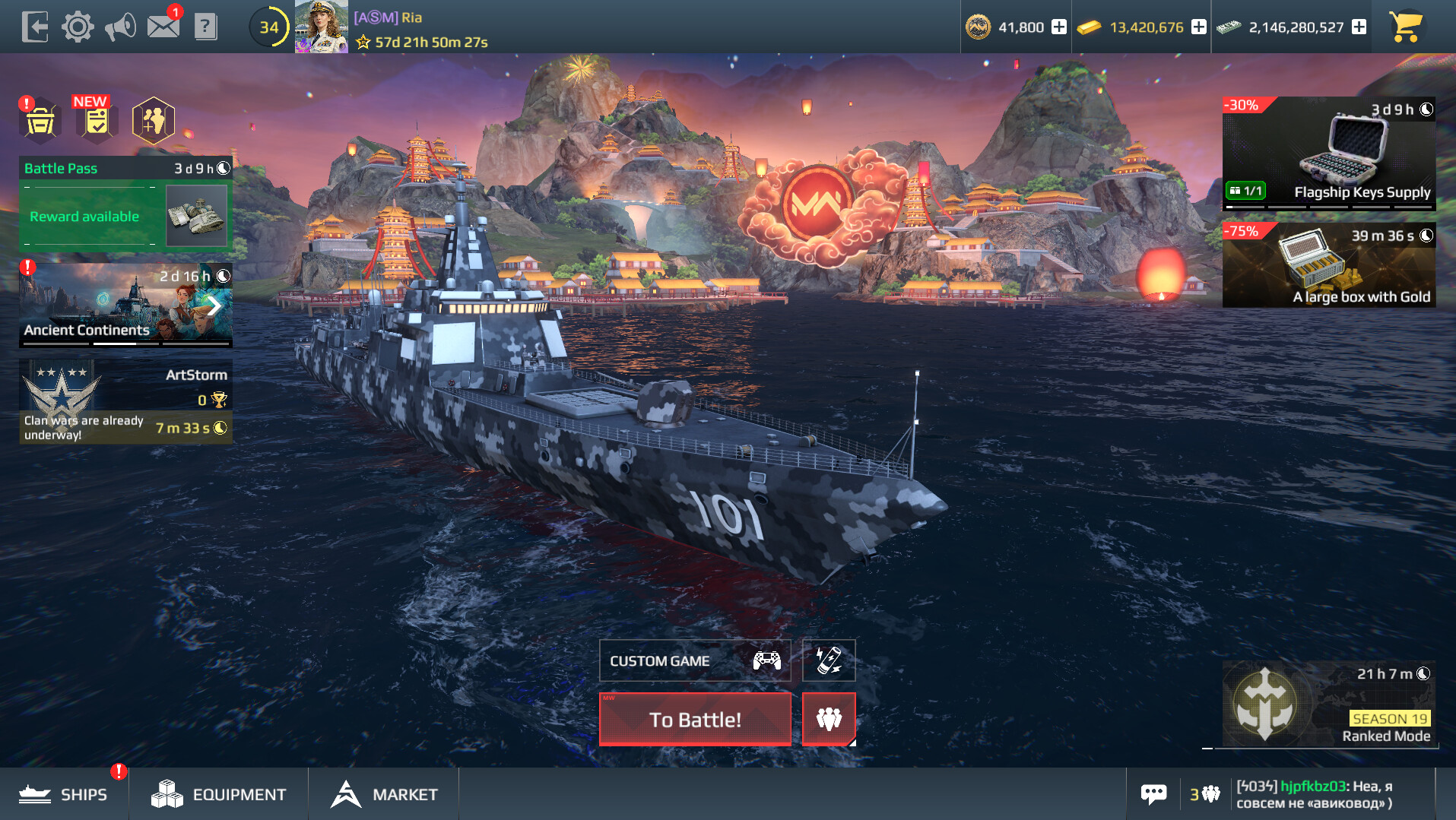
Open your player profile by tapping your nickname in the main menu. Your ID is displayed in the account information.
We recommend including your ID whenever you contact Support.
6. How do I change my avatar?
Tap your nickname in the main menu, then tap your current avatar. You can then select one of your available avatars in the Avatar Editor.
7. How do I get a colored nickname?
Colored nicknames are reserved for special statuses, such as moderators and developers, and are not available as a regular profile customization option.
8. My account has been hacked. What should I do?
Secure the authorization methods linked to your account as soon as possible: change the password for your email or other connected service and enable additional security measures where available.
Then contact Modern Warships Support and provide your account information.
9. My account has been banned. What should I do?
If you want to find out the reason for the ban or appeal it, contact Support.
Bans may be issued for violations of the game rules and Terms of Use, including the use of prohibited software, exploitation of vulnerabilities, and other violations.
⠀⠀⠀
⠀
In-Game Resources
Read the detailed Guide to Currencies.
1. What are in-game resources used for?
Different in-game resources are used to purchase:
- ships;
- weapons and equipment;
- consumables;
- upgrades;
- customization items;
- other in-game items.
Different parts of the game use different types of currency.
2. What is Gold used for?
Gold is one of the main in-game currencies. It is used to purchase certain ships and equipment, Premium Account, Battle Pass stages, and Daily Mission refreshes.
3. What are Dollars used for?
Dollars are the basic in-game currency in Modern Warships.
They can be used to purchase ships, equipment, Upgrade Points, and consumables.
4. How can I earn Gold and Dollars?
Gold and Dollars are awarded for participating in most game modes.
Rewards are not granted in Custom Games and may differ in special modes, including Ranked Mode.
Gold and Dollars can also be obtained through various in-game rewards and activities.
5. What are Artcoins used for?
Artcoins (AC) are a special currency used on the Market.
Players can use Artcoins to purchase market ships, aircraft, and equipment from other players.
For more information about this system, see the Market article.
Artcoins can be obtained by selling items on the Market, purchasing them from the in-game store, and watching ads.
6. What are Ranked Season Coins used for?
Ranked Season Coins are used to purchase items in the Ranked Store.
They are awarded at the end of a Ranked Mode season. The amount received depends on the rank achieved by the player at the end of the season.
7. What are consumables?
Consumables are items used directly during battle to improve the effectiveness or survivability of your units.
Available consumables depend on the type of unit:
- Repair Kit — restores ship HP;
- Missile Countermeasures — disrupt the guidance of incoming missiles;
- Ammunition Reserve — replenishes ammunition;
- Aircraft Missile Decoy — protects aircraft against incoming missiles;
- Torpedo Countermeasures — disrupt the guidance of incoming torpedoes.
Standard consumables also have Advanced versions.
There are also Tactical Consumables:
- Engine Boost — temporarily increases ship speed;
- Electronic Warfare — reduces damage received from guided weapons;
- Oxygen Reserve — replenishes a submarine's oxygen supply;
- Smoke Screen — creates a smoke screen that makes it harder for enemies to target your ship.
8. How do I buy consumables?
Consumables can be purchased through the corresponding Store section or the Ammunition menu.
The number of consumables you currently own is displayed in the game interface.
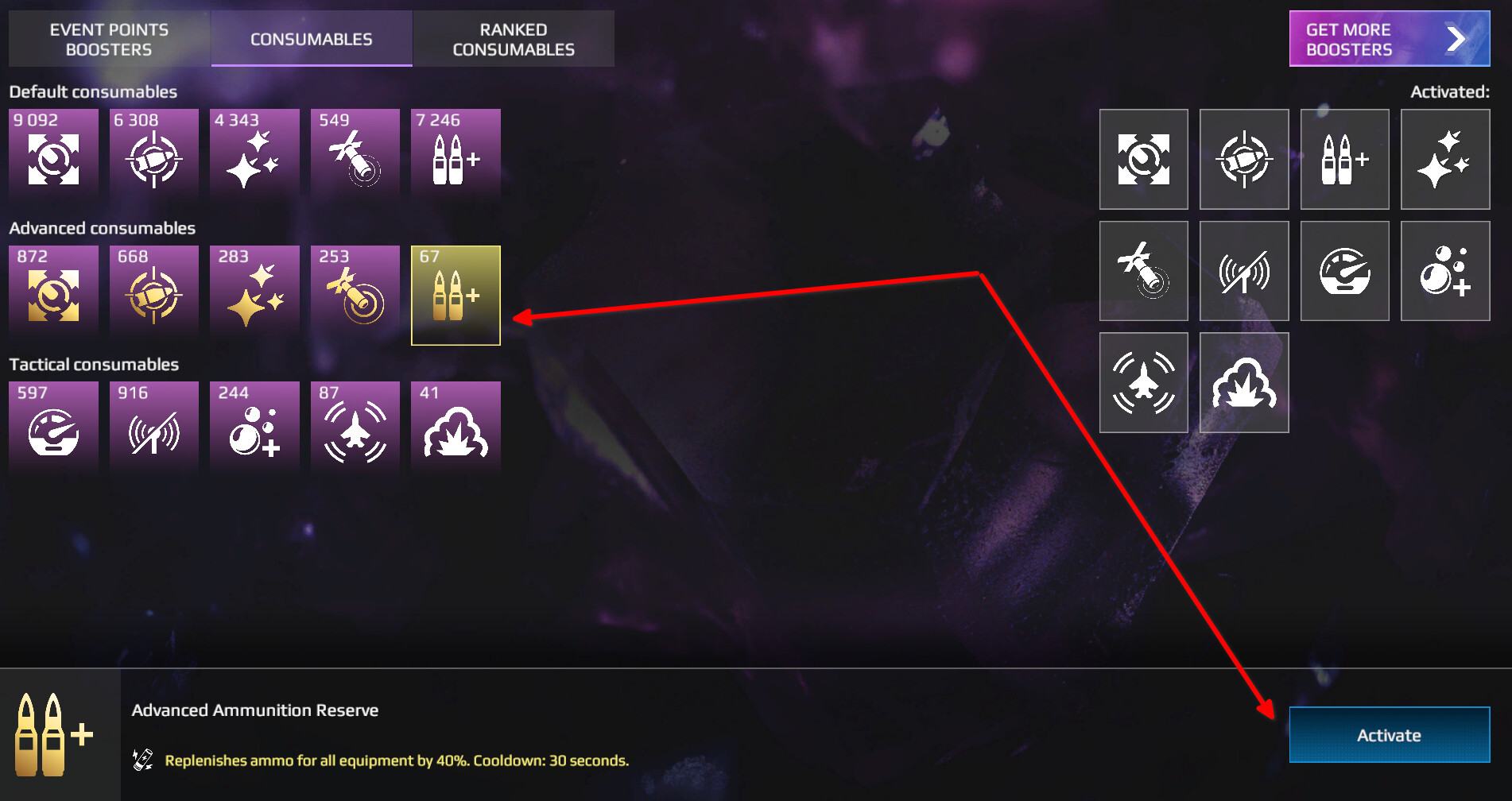
9. How do I activate Advanced Consumables?
To use Advanced Consumables:
- Open the Port.
- Go to the Ammunition menu.
- Select the desired consumable.
- Tap Activate.
The selected version will then be used instead of the standard consumable.
10. Can in-game resources be exchanged for one another?
The main in-game resources cannot be exchanged directly unless a specific game system or event explicitly provides such an option.
11. Can I transfer resources to another player?
No. Direct transfers of in-game resources between accounts are not available.
13. How do I buy or sell equipment?
Open the Equipment Shop, select the required category and item, then confirm the purchase.
Equipment can be sold through the Inventory tab in the Equipment Shop. Some Market equipment can only be sold through the Market.
14. How do I sell a ship?
Some ships can be sold for Artcoins through the Market.
To list a ship for sale:
- Open the Market.
- Go to the Inventory tab.
- Select a ship that is eligible for trading.
- List it for sale.
Ships purchased with Gold, Dollars, or Ranked Season Coins cannot be sold.
15. What is Premium Account?
Premium Account increases the amount of certain resources and experience earned in battles.
It provides:
- +50% Experience earned per battle;
- +50% Gold earned per battle;
- +50% Dollars earned per battle.
Premium Account may be included in various offers and rewards or purchased separately.
16. What are Upgrade Points?
Read the detailed Upgrade System article.
Upgrade Points are used to improve the characteristics of ships and equipment.
Upgrades are performed through the corresponding menu for the selected ship or item.
17. Where can I get Upgrade Points?
Upgrade Points can be earned or purchased through various in-game activities, rewards, and Store offers.
The currently available methods are displayed directly in the game.
19. How do I use Upgrade Points?
Select a ship and open the Workshop.
You can upgrade a ship or equipment parameter by one stage or upgrade it directly to the maximum level.
⠀
⠀
Ships, Equipment, and Aircraft
1. How do I install equipment on a ship?
Select a ship, then tap the weapon or equipment slot you want to change. The interface will display a list of items that can be installed in that slot.
This allows you to replace missile batteries, cannons, grenade launchers, and other replaceable equipment.
2. What are flags and camouflages used for?
Flags and camouflages are used to customize the appearance of your units.
If a specific item provides any additional effects, they are listed in its description.
3. How are ships purchased with Gold different from ships purchased with Dollars?
They differ in how they are obtained, their characteristics, equipment loadouts, and possible economic bonuses.
You can view all major ship characteristics in its information window before purchasing it.
⠀⠀
Weapons
1. What are torpedoes?
Torpedoes are underwater weapons used by submarines and certain surface ships and aircraft.
They are especially effective against naval targets, although some weapons can destroy incoming torpedoes.
2. What is a cannon?
Cannons are one of the main types of ship weapons.
They differ in caliber, damage, rate of fire, range, and other characteristics.
When firing at a moving target, you need to account for the target's distance and speed, as well as the projectile's travel time.
3. What are grenade launchers used for?
Grenade launchers are used against naval targets. Some models can also destroy torpedoes and submarines.
Their effectiveness depends on the characteristics of the specific model and the distance to the target.
4. How do missiles work?
Missiles are the main type of weapon on most ships and can deal significant damage to enemy targets. They can be intercepted by enemy Air Defense or diverted using Missile Countermeasures. Missile ammunition is limited.
Missile batteries are divided into two types: anti-ship missiles (ASMs) and submarine-launched ballistic missiles (SLBMs).
They differ in range, damage, speed, guidance type, and resistance to countermeasures.
5. What are autocannons?
Autocannons automatically engage suitable targets within their operational range.
6. What is Air Defense used for?
Air Defense is used to counter enemy missiles and aircraft. Air Defense systems can be gun-based, missile-based, or laser-based, and different systems are effective against different types of targets.
Air Defense is most effective when ships stay together as a group. Maneuvering the ship reduces Air Defense effectiveness.
⠀⠀
⠀
Aircraft
1. What are helicopters used for?
Helicopters can:
- detect enemies;
- expand reconnaissance capabilities;
- attack surface and air targets;
- help detect submarines.
Their capabilities depend on the specific helicopter model.
2. Can I return a helicopter to the ship?
Yes. A helicopter can be returned to the ship to restore its HP and replenish ammunition.
3. What are Strike Fighters used for?
Strike Fighters are attack aircraft designed primarily to engage enemy ships. They are based on aircraft carriers and have limited ammunition.
Their weapons and playstyle depend on the specific model.
4. What are Fighters used for?
Fighters are designed primarily to engage enemy aircraft. They are based on aircraft carriers and have limited ammunition.
They are especially useful for protecting the aircraft carrier and allied aircraft.
5. What are Drones used for?
Drones are attack aircraft whose primary targets are enemy ships. Compared with Strike Fighters, Drones have increased strike power and HP. Their main targets are enemy ships, although some Drones can also effectively counter enemy aircraft.
Their ammunition is limited.
6. What are Bombers used for?
Bombers are heavy attack aircraft designed to engage enemy ships.
Bombers are among the most dangerous aircraft types in the game. They have relatively low speed but a large amount of HP. They are based on Assault Carriers and have access to a wide range of weapons. Their main targets are all types of ships.
Their ammunition is limited. Bombers can only be installed on Assault Carriers.
7. Can I replace the weapons on an aircraft or helicopter?
No. Aircraft weapons are built into the unit and cannot be replaced separately.
8. How do I reload aircraft during battle?
When playing an aircraft carrier, aircraft can be reloaded by flying over the carrier's deck. This starts the ammunition replenishment process and, when necessary, restores lost aircraft units.
Helicopters can be returned to the ship to restore HP and replenish ammunition.
If several helicopters occupy the same slot, they can be reloaded separately.
⠀
⠀
Game Features
1. Can I play Modern Warships without an internet connection?
No. A connection to the Modern Warships servers is required to launch the game and use its systems.
The game has an Offline mode against bots, but an internet connection is still required to start it.
2. How do I add another player as a friend?
You can add another player:
- through their profile;
- through the in-game chat;
- through the player list;
- by searching for their nickname or ID, where this option is available.
3. Why can't another player add me as a friend?
Check your privacy settings and make sure incoming friend requests are enabled.
You may also have reached the friend list limit, or you and the other player may be using different game versions. In the latter case, update the game to the latest version.
4. How do I disable Squad invitations?
Open Settings → Game and enable the option that blocks incoming Squad invitations.
5. How do I disable incoming friend requests?
Open Settings → Game and enable the option that blocks incoming friend requests.
6. What is a Custom Game?
Custom Game allows players to create their own room and configure match settings.
It can be used for training, playing with friends, competitions, and other custom matches.
7. How do I create my own room?
- Open the game mode list.
- Go to Custom → Team Deathmatch.
- Configure the room settings and tap Create.
8. How do I join another player's room?
Open the Custom Game section and find the required room by entering its room ID, if the creator has provided it to you.
9. What is the Black List?
The Black List allows you to limit interaction with selected players, primarily by hiding their messages in the in-game chat.
10. How do I add a player to the Black List?
Open the player's profile through the chat or another available player list and select the block option.
11. How do I remove a player from the Black List?
Open Settings → Account → Black List and remove the required player from the list.
12. How do I create a Squad?
Open the Squad menu in the Port — the red button with three person icons — and invite players from your friends list or through their profiles.
13. How do I use voice chat in a Squad?
Allow the game to access your microphone and enable voice chat in the settings.
Other Squad members must also allow voice chat if they want to use it.
14. What restrictions apply to Squads?
Squad size and composition are limited by the rules of the selected game mode.
If a particular combination of units cannot be used together, the game will notify you before matchmaking begins.
15. What game modes are available?
Complete article about game modes.
Modern Warships features a variety of game modes available in Offline and Online formats:
- Team Deathmatch;
- Domination;
- Deathmatch;
- Custom Game;
- Ranked Mode;
- Air Combat;
- temporary Event modes.
The list of available modes may change with updates and events. For more information, see the Game Modes article.
16. What happens if I receive a ship that is already in my fleet?
You cannot own two copies of the same ship.
You will receive compensation, which is shown in the reward information window for the corresponding activity. In other cases, you may receive compensation in in-game currency equivalent to the ship's full Store price.
17. Why are regular rewards unavailable in Custom Game?
Regular battle rewards are disabled in Custom Game to prevent artificial farming of resources, damage, eliminations, and other statistics.
18. What are Likes used for?
Likes allow players to give positive feedback to other participants after a battle.
They reflect the community's appreciation of a player but do not provide any combat advantage.
19. Why can a ship of one Tier be matched into a higher-Tier battle?
Check the equipment installed on your ship. Using equipment from a higher Tier may affect the available battle range and matchmaking.
⠀
⠀
Battle
1. How do I view the player list during battle?
Tap the timer at the top of the screen (Tab on PC). This opens the match participant list and basic information about both teams.
2. What is Spectator Mode?
Spectator Mode allows you to follow the battle without directly controlling a unit.
It may become available after your unit is destroyed or in Custom Game.
3. What is Hide Interface mode?
Hide Interface mode removes interface elements so that players can take screenshots or record cleaner gameplay footage.
Availability of its functions may depend on the game mode.
4. How does enemy detection work?
Read the detailed Visibility System article.
Helicopters and other units can be used for reconnaissance and enemy detection.
When your ship is detected, a special indicator appears on the screen.
To break detection, you need to leave the enemy's direct line of sight, for example by hiding behind an obstacle.
5. How do I return a helicopter to the ship?
Use the helicopter return command if it is available for the selected unit.
After returning, the helicopter can restore its HP and prepare for another deployment.
6. Can I manually land an aircraft on an aircraft carrier?
Manual aircraft landing on the deck is not a separate gameplay mechanic.
Aircraft restoration and ammunition replenishment use the aircraft carrier mechanics and return commands available through the interface.
7. How do I stop being detected by the enemy?
Break the enemy's direct line of sight by using islands and other obstacles, or increase the distance between you and the enemy.
After contact is lost, your unit will eventually disappear from the enemy's view.
8. How can I tell if my ship has been detected?
A special detection indicator appears on the screen.
It shows that the enemy has received information about your unit's position.
9. How do I dive and surface in a submarine?
Use the dive or surface button and wait for the maneuver to complete. Keep an eye on your submarine's oxygen supply.
10. Why can't a submarine dive immediately after being forced to surface?
If the oxygen supply has been fully depleted, the submarine must restore it to the required level.
Once enough oxygen has been restored, diving becomes available again.
11. How do I destroy torpedoes?
Some grenade launchers and other suitable systems can destroy incoming torpedoes.
Check the description of a specific weapon — the ability to intercept torpedoes is listed in its characteristics.
12. How do I evade a torpedo?
Use maneuvering and terrain to your advantage. Depending on the type of torpedo, additional countermeasures may also be available.
13. How do I detect a submerged submarine?
Submerged submarines can be detected by another submarine, helicopters, units or weapons with the appropriate detection capabilities, or by moving closer to them.
14. Why can aircraft fly beyond the map boundaries?
The boundaries of the combat area work differently for aircraft than for ships.
This allows aircraft to turn and maneuver near the edge of the combat zone.
15. What is the difference between Fighters and Strike Fighters?
Strike Fighters are designed primarily to attack ships.
Fighters specialize in engaging enemy aircraft.
16. Why does a ship need Air Defense?
Ship Air Defense is designed to counter enemy missiles and aircraft.
Air Defense systems are also divided by specialization: some are better at intercepting incoming missiles, while others are more effective against aircraft. If your ship allows it, using a combination of different Air Defense systems is generally the most effective option.
18. How do I reload aircraft during battle?
Aircraft reloading depends on the type of unit.
When playing an aircraft carrier, aircraft can be reloaded by flying directly over the carrier's deck. This starts a reload timer. Once it is complete, you can replenish ammunition and/or restore a lost aircraft.
Helicopters can be returned to the ship to restore HP and reload. Press T to send the helicopter back to the ship automatically.
Reload time depends on the helicopter's condition: a helicopter with full HP and ammunition reloads faster, while a damaged helicopter or one with depleted ammunition takes longer.
If several helicopters occupy the same slot, they can be sent for reloading individually. In this case, each unit has its own reload bar.
⠀
⠀
Market
Read the detailed Market article here.
1. What is the Market?
The Market is Modern Warships' in-game trading platform where players can buy and sell tradable ships, aircraft, and equipment using Artcoins (AC).
Not all in-game items are eligible for trading.
2. How do I buy or sell an item?
To buy an item, open the Market, select the desired item, and place a buy order or use an available sell offer.
To sell an item, open the Inventory tab, select an item that is eligible for trading, set a price, and confirm the sell offer.
3. Why did some of my Artcoins disappear after I placed an order?
When a buy order is placed, the required amount of Artcoins is reserved until the order is completed or canceled.
4. Can I sell an item directly to a specific player?
No. Direct trading between two selected players is not available. All transactions are processed through the Market's general order and offer system.
5. Why can't I sell an item?
Only items specifically eligible for trading can be sold on the Market. Some items may also have a temporary trading restriction after they are obtained.
For more information about trading, orders, price formation, and restrictions, see the separate Market article.
⠀
⠀
Clans
1. What are Clans for?
Clans allow players to form permanent communities.
Members can communicate, play together, and participate in available Clan activities.
2. How do I create a Clan?
Open the Clans section and select the option to create a new Clan.
You must meet the requirements shown in the interface, select a Clan name and tag, and pay the creation cost if applicable.
3. What roles are available in a Clan?
Clans include several roles with different levels of authority.
The Clan Leader manages the main settings, while additional roles allow responsibilities to be distributed among Clan members.
4. What is Clan Rating?
Clan Rating reflects the Clan's activity and achievements.
It may be used in Clan competitions and other related systems.
5. How are Clan Activity Points earned?
Clan Activity Points are awarded only for destroying real players in Online modes.
Destroying a player who belongs to a Clan awards 10 Clan Activity Points. Destroying a player who is not in a Clan awards 5 Clan Activity Points.
Participating in Clan Wars allows you to earn significantly more Clan Activity Points. Detailed information about Clan Wars is available in the Clans section of the game.
6. What rewards does a Clan receive at the end of a Clan season?
A Clan Wars season lasts one month. Clan Wars take place from Friday through Sunday across four time periods. Players can participate in Clan Wars in Squads made up of members of their Clan using Tier II and Tier III ships.
At the end of the season, the Clan receives one of several reward sets depending on the Clan Activity Points earned.
Individual rewards are also available based on each player's personal activity within the Clan.
For more information, see the Clans section in the game.
7. Can an accidentally deleted Clan be restored?
No. Deleting a Clan is irreversible.
Always double-check the selected action before confirming deletion.
8. Can Clan leadership be transferred?
Yes. Clan leadership can be transferred through Support.
9. Can I use the name and tag of an existing Clan?
No. You cannot use a name or tag that is already taken or intentionally imitates another existing Clan.
⠀
⠀
Battle Pass
Read the detailed Battle Pass article.
1. What is the Battle Pass and how does it work?
The Battle Pass is a seasonal progression system that refreshes every month and consists of 40 stages.
It includes three reward tracks:
- Free — available to all players;
- Premium — unlocks an additional reward track and immediately unlocks 5 stages;
- VIP — includes additional seasonal rewards and immediately unlocks 15 stages.
To progress, earn Pass Points by completing Daily Missions. Each stage requires 30 Pass Points.
2. How do Daily Missions work?
Every day, players receive 5 Daily Missions that reward Pass Points and additional rewards when completed.
With an active Premium or VIP Pass, 2 additional missions are available each day.
A mission that does not suit you can be replaced for Gold. After completing all available missions, you can also refresh the mission set early.
Battle Pass stages can also be purchased with Gold instead of completing missions.
3. Can I complete the Battle Pass more than once?
Yes. After completing all 40 stages, you can reset the Battle Pass for 2,500 Gold and complete it again.
A maximum of 2 resets are available per season.
For a repeated run, the Premium or VIP Pass must be purchased again if you want to receive rewards from the corresponding tracks again.
4. What are Battle Pass Credits?
Battle Pass Credits are a special currency earned by progressing through the Battle Pass. They can be spent in the Battle Pass Store on ships, aircraft, and equipment.
Credits carry over between seasons, so they can be saved. On January 1, all unspent Battle Pass Credits are automatically converted into Gold.
Premium and VIP Passes allow players to earn more Credits per season.
5. How does the Battle Pass Store work?
The Battle Pass Store allows players to spend Credits on new unique items and content from previous seasons.
The inventory refreshes at the start of each new season, although some items may remain available for more than one season.
Items have purchase limits, and some positions only become available after reaching a specific stage of the current Battle Pass.
The first purchase of the season in each main Store category receives a 30% discount. The discount becomes available again at the start of the next season.
6. What is Seasons Storage?
Seasons Storage allows players to obtain rewards from previous Battle Pass seasons.
After purchasing an archived season, its rewards can be unlocked using Vault Coins, which are earned in the current Battle Pass.
Purchased seasons do not expire, but each season in Seasons Storage can only be completed once.
For more information about rewards, the Battle Pass Store, Credits, and Seasons Storage, see the separate Battle Pass article.
⠀
⠀
Game Chat
Read the detailed Game Chat Rules.
1. Where can I read the chat rules and report a violation?
The rules are available in the in-game chat by tapping the "i" icon.
If another player violates the rules, you can call a moderator or save a screenshot and the player's ID and submit a report to Support.
2. What should I do if I disagree with a chat restriction or a moderator's actions?
Contact Support and provide:
- your account ID;
- a description of the situation;
- the date and approximate time;
- screenshots or other evidence, if available.
Support can review both the reason for the restriction and the moderator's actions.
3. How do I change the language of the in-game chat?
The regional chat available to you depends on your device's language settings.
⠀
⠀
Other
Matchmaking. How does matchmaking work?
Matchmaking forms teams from available players based on the parameters used by the matchmaking system.
Account level alone does not represent the strength of a player's ship or their level of experience, so players with different account levels may appear in the same battle.
Tournaments
Modern Warships hosts official and community tournaments.
You can earn Hero and Legend status in community tournaments. To participate, follow the instructions in the mw | community tourneys channel on our official Discord server.
You can also join our Esports Discord server.